




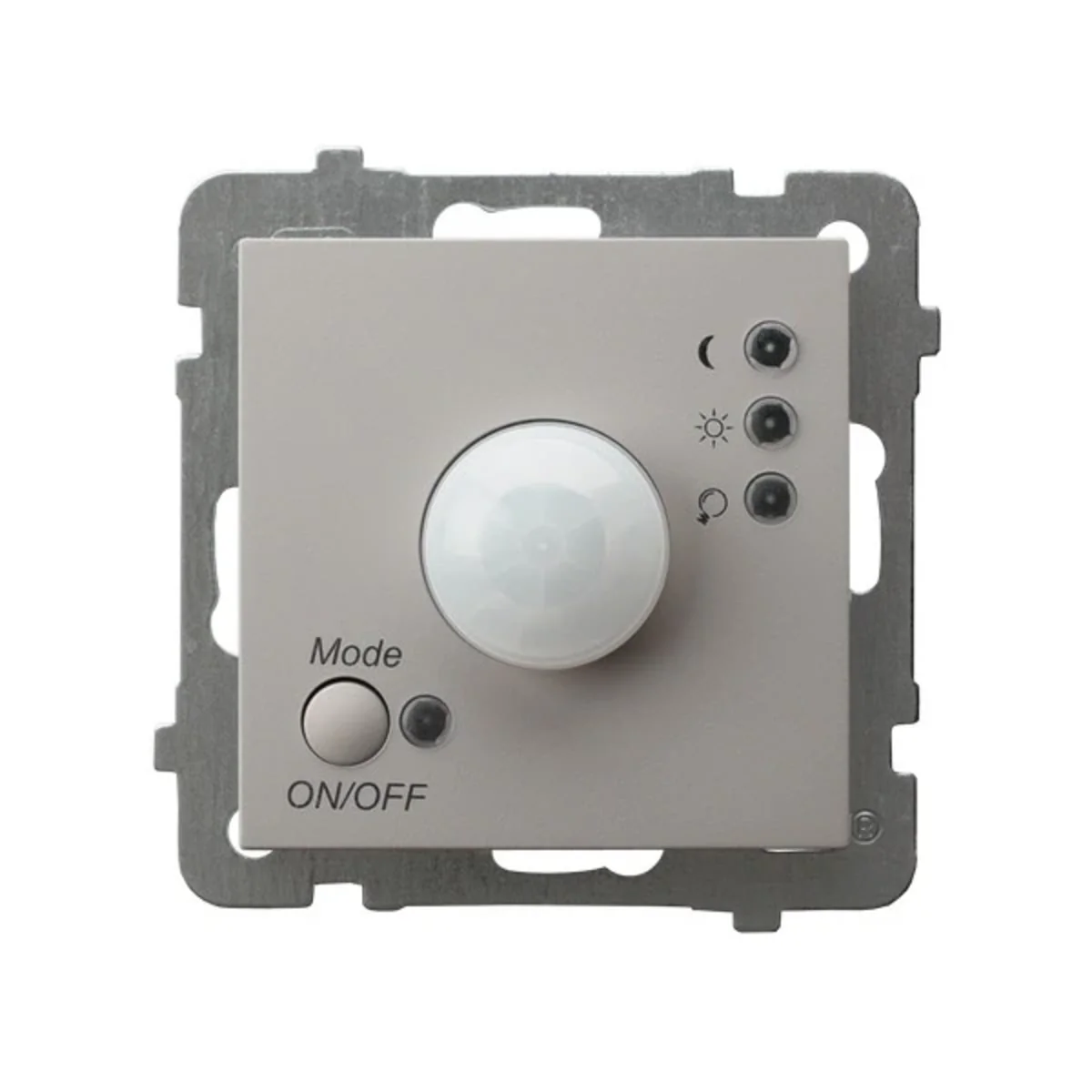
AS Electronic Motion Sensor Cashmere ŁP-16G/M/82
local index:
MWC019OSPE
Catalog number:
ŁP-16G/M/82
EAN code:
5906729037349

Price:
300,00 zł
gross / pcs.
(including VAT 23%)
 On request
Quantity pcs.
(multiplicity:
1
)
 Add to inquiry
 Add to clipboard
 Print
Print
 Ask about the product
Product description
The electronic motion sensor is used to automatically turn on light sources and signaling equipment (e.g. in home alarm systems) when motion is detected within the range and to automatically turn them off after a set time.
The sensor's design allows it to be used to build serial installations consisting of any number of sensors, as well as with other standard switches for home use (e.g. single-pole or variable). The sensor is controlled by pressing the button located in the lower left corner of the outer cover marked MODE/ON/OFF. It is possible to set one of five working modes:
-
-
OFF – disabled mode (sensor completely disabled). The relay diode (near the bulb pictogram) lights up green.
-
ON – On mode (the sensor turns the lighting on permanently - it acts as a single-pole switch) the relay diode (next to the light bulb pictogram) lights up red.
-
MOTION - DAY- mode in which the lighting is turned on when the sensor detects movement, regardless of the light intensity in the room in which the sensor is installed (day or night). The "motion" mode LED (next to the sun pictogram) lights up red. “relay” diode (next to the light bulb pictogram) lights up green if the lighting is off or red if the lighting is on.
-
MOTION - NIGHT – mode in which the lighting turns on when the sensor detects movement, but only when the light intensity in the room in which the sensor is installed drops below a certain level. This level is defined by the user by turning the adjustment knob (labeled LUX) located on the control module under the outer cover of the sensor on the left. The adjustment range is from 0 to 1000 lux. During this mode, the "motion - night" LED (next to the moon pictogram) lights up red, while the relay diode (next to the bulb pictogram) lights up green if the lighting is off or red if the lighting is on.
-
RANDOM - presence simulation mode – is a form of protecting the room against burglary during a long-term user absence. After dusk, the sensor will turn on the lighting at a randomly selected time in the range of 10 to 60 minutes for the time set by the user, multiplied by a random multiplier in the range of 1÷3. The time setting is adjusted using the knob (labeled TIME) located on the control module under the outer cover on the right. The adjustment range is 3 seconds to 5 minutes. During this mode, 2 LEDs (next to the sun and moon pictograms) flash red alternately.
-
Control button lock function
If the product is installed in a public facility (e.g. a hotel), the building administrator often does not want random people to have the ability to change the motion sensor's operating mode setting. In such a case, you should use the control button lock function. It is initiated by pressing and holding the above button for approx. 10 seconds. During this setting, the sensor will not respond to short-term pressing of the button. You can also cancel the lock function by pressing and holding the button for approximately 10 seconds.
Technical data
-
Detection angle [°]136
-
MaterialPlastic
-
InstallationFlush-mounted
-
FamilyAS
-
Dimensions [mm]84 x 84
-
Accurate colorCashmere
-
ColorBeige
-
FixingThread clamps
-
Rated voltage [V]230
-
Level of securityIP20
-
Sensor range [m]7
-
Load [W]Incandescent: 3200W, fluorescent: 750W, induction: 750W
Other technical data
-
ModelMovement sensor
-
Suitable for ceiling mountingNo
-
Connection typeOther
-
Material qualityThermoplastic
-
Surface protectionLacquered
-
Anti-bacterial treatmentNo
-
TransparentNo
-
Width71 mm
-
Depth59 mm
-
Mounting methodFlush-mounted
-
Suitable for wall mountingYes
-
MaterialPlastic
-
Halogen freeYes
-
Surface finishingMatt
-
ColourOther
-
Degree of protection (IP)IP20
-
Height71 mm
Manufacturer details
-
ManufacturerOSPEL S.A.
-
Address42-436 Wierbka Główna 128 Polska
-
E-mail
Bulk packaging
| A kind of package | Pudełko |
| Quantity | 5 pcs. |
| Width (m) | 0,710 |
| Length (m) | 0,710 |
| Depth (m) | 0,310 |
Report an error
Monday - Friday: 7:00 - 17:00
Saturday: 8:00 - 13:00
phone: 12 269 12 12
email: info@el12.pl
order processing:
Monday - Friday: 7:00 - 15:00
email: esklep@el12.pl
phone: (+48) 609 697 377

Headquarters address:
ul. Św. Anny 5, 45-117 Opole




Copyright - 2026 Przedsiębiorstwo el12 sp.z o.o. All rights reserved.
Electrical shop el12 - online electrical wholesaler.
